You've done it now. You thought that you were going to get some interesting information about modding your GameBoy Color, yeah? Here's the thing — I didn't mod my GameBoy Color. Neither should you.
The GBC Screen Rant
13 May, 2026
Read Time: 7 min
What?
Look at this.
I'm going to show you what an original GameBoy Color screen looks like outside, in less than ideal light conditions. The first one is in direct sunlight, and the second one is in the shade. Are you ready?
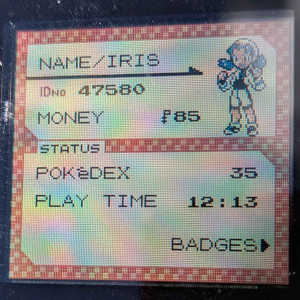
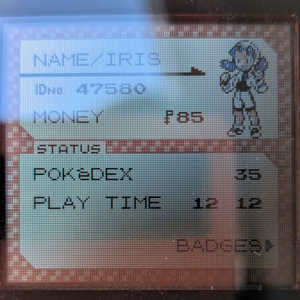
Yeah. For a first pass, this is looking really good. In the shade, there's a little bit of glare on the camera, but the colors are still really well defined. Even though the screen is tiny, the pixels are perfectly crisp. Everything looks exactly how it should.
Next I'm going to show you the screen of an Analogue Pocket, which is the best GameBoy replacement that money can buy. It's four times the price of the original console. Their website boasts that their 3.5" LCD has "pro level color accuracy, dynamic range, and brightness... There has never been a display this advanced in a video game system."
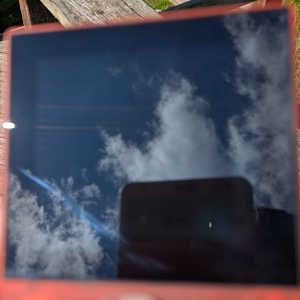
Yeah. I can't see shit.
After an incredible number of attempts, I finally managed to get these halfway decent pictures while there was a hair stuck to the screen. I'm not going outside for a second round.
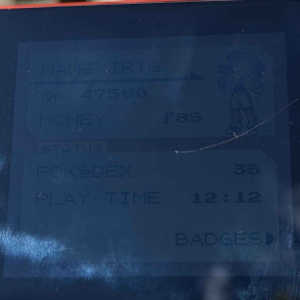
Obviously, the image on the left is absolute dogwater. You can barely see anything. This is what it looks like when you look at it with your eyes: A black square with a few blurry pixels inside.
This is because the GameBoy Color is a console that was designed to use outside. That little unlit screen is a powerhouse when it has good light coverage — and even when it doesn't, you can still see it. It's not like the shaded GBC screen is just a black rectangle.
But yeah. Okay. Let's play fair and just take a look at the shaded version of each screen. Let's give the Analogue Pocket the advantage.
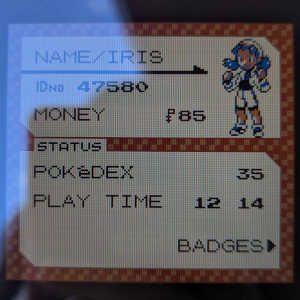
GameBoy Color | Analogue Pocket
Hey, look, the colors are wrong.
Why does my Pokémon character have a sunburn? And remember, this is "pro level color accuracy." This is the kind of screen that you get when you spend hundreds of USD on a luxury GameBoy replacement. The screen is clearly, obviously oversaturated!
To pull the curtain back a little bit, the reason that I used an Analogue Pocket for this comparison is because people have been dunking on the GameBoy Color's screen for as long as I can remember.
Here's Linus Tech Tips doing it:
"Wow! I forgot how small and crappy that screen was. How's the d-pad compare? ...I mean, this poor thing is like twenty years old, so... Yeah, it's pretty mushy. This is definitely better."
But it's not actually better!
Any CRT enthusiast will tell you that removing games from the technology they were designed for creates nothing but problems.
Here are some that you face with a "modern" GameBoy Color screen:
- Brightness. You can't see anything in bright lighting. Linus might be happy playing games in a dark studio office, but are you really going to spend $50 USD for a pocket-sized console that you can't use outside?
- Battery life. GBC modders get away with the power draw of a big, expensive screen by soldering them to modern lithium-ion batteries — fixing a problem that the original console never had.
- Pixel stretching. Analogue cheekily skips this issue by making their screen ten times the resolution that it needed to be. But what about cheaper LCDs and OLEDs? How blurry do those pixels have to be for that "small and crappy" screen to be a better option for the price?
- Color clarity. GBC games were designed for their colors to be desaturated by the light hitting the GameBoy's screen. This is why skin tones become neon orange when you look at them on the replacement. The highest-quality options use software filters to recreate the color palette... and it still doesn't work. It's a huge compromise! Why would you want to pay extra for it?!
- Durability. High-quality replacement screens are laminated (attached to their glass). If you scratch a GBC screen, the plastic panel is replacable. If you scratch a laminated screen, you have to replace the entire screen. I know this very well because I had to replace half of my PS Vita just to fix a chipped piece of glass. That'll be another $50, please!
With CRTs, it's easy to argue that you're trading the historical context of the game for lighter weight, better visibility, more compatibility, and the ability to use the TV that you already own — but for a handheld console, it comes pre-packaged with the original screen!
It's nothing but additional work, additional cost. You're not trading functionality for convenience, you're trading it for inconvenience! The original screen works fine. It looks good. There are reasons that you might think the original screen is a poor fit for you, but there are many options (like emulation...) that don't require you to double the price of the console to install a new screen.
Please: Investigate the mods that you're buying and installing. Make sure that it's worth the wait! I have spent a lot of time and a lot of money making big mistakes — and you shouldn't have to.
I hope that this secret article saved you some money somehow, and I hope that you enjoyed reading it. Even if you just liked it for the ranting, I still appreciate people looking for and reading editorials like this.
So, thank you for reading.
This article was written in 2026. Screens will change in the future, and hobbyists are — believe it or not — trying to make better drop-in GBC screens. That means that this article might not make sense if you read it later down the line.
If there is ever a well-manufactured replacement for the original GBC screen, I will be very, very happy. - Iris